If you are looking for a solution for TGA on Vista and Windows7 both 32 and 64 bit check out FastPictureViewer WIC RAW Codec Pack.
Can you figure out what's different about this picture?
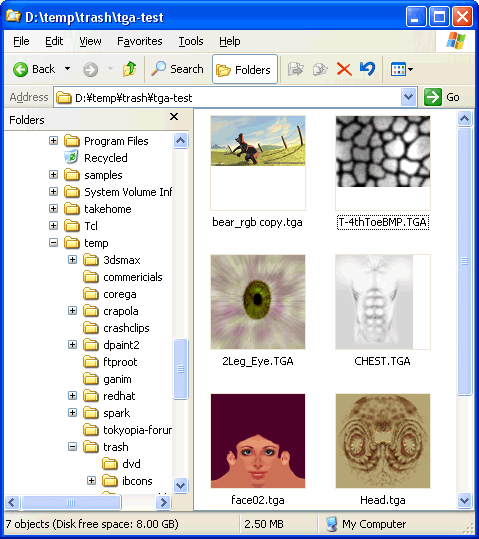
Look close.....The difference is you are seeing thumbnails for TGA files inside Windows Explorer!!! That also means you can see them inside pretty much any file open / file save dialog. Hooray!
Windows 2000 and XP provide thumbnails for .JPG, .GIF, .BMP, .AVI, .MPG and a few other formats. What's cool though is Windows 2000 and XP also provide an API for adding support for more formats. So, I found an example, whipped out some old TGA code and threw this together.
Not too many *normal* people use the TGA format but in the video and computer game industry it's pretty popular. Probably because it's supported by most graphics software and because it's very simple to use. You can read or write a basic TGA file in just a few lines of code.
Just in case you are not aware, the same function is available inside the normal Windows standard file open/save window so for example if you are in Maya selecting a texture file you can select by clicking on a thumbnail instead of having to remember the name of the file.
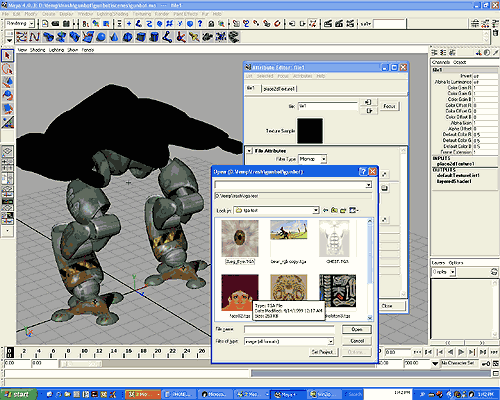
To do this, in the file open/save window you click the last icon on the right and pick "thumbnails" (1)
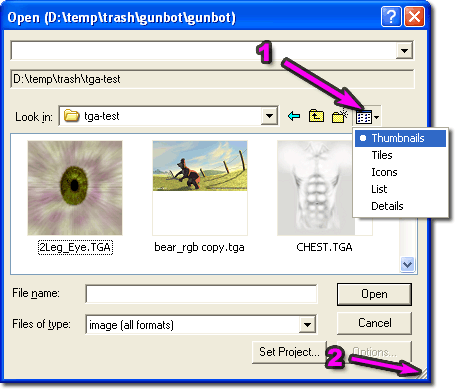
Also, just incase you didn't notice you can resize the standard file open/save window (2) so that you can see more files at once.
Download:
You can download the installer by clicking the link below.
thumbplug_tga1.10.exe(268k)
[ for TGA (Targa) files ]
There is also a version for Softimage PIC files.
thumbplug_pic1.11.exe(309k)
[ for PIC (Softimage) files ]
And for Maya IFF files.
thumbplug_iff1.09.exe(314k)
[ for IFF (Maya) files ]
THERE IS NO WARRANTY HERE. USE THIS AT YOUR OWN RISK! THERE IS ALSO NO SUPPORT!
Notes:
The TGA(Targa) format supports many formats but most of them are pretty rare. For example, TGA files can have their images stored in any direction, right to left, bottom to top, top to bottom, left to right. They can also support 15 and 16 bit pixels. But, in my personal experience, I've never seen a TGA file stored any way other than bottom to top
- left to right. I've also never personally used a 16 bit TGA file nor have I used or seen any of the other options. Therefore, there is no support for those other formats in this plug in. If you need support, see below
The PIC format also supports many formats. This plugin currently only supports 24bit and 32bit files.
Version History:
TGA v1.09 2003-02-02
- first public release
v1.10 2004-08-15
- attempted to fix issues with vertically flipped files
PIC v1.11 2003-02-02
- first public release
IFF v1.09 2003-02-02
- first public release
Source Code:
The source is provided under a FreeBSD style license. If you do find a bug or add a feature I'd be happy to hear about it for if you find it really useful it would be nice to hear.
You can download the source code here
thumbplug_tga_src1.10.zip(28k)
[ for TGA (Targa) files ]thumbplug_pic_src1.11.zip(25k)
[ for PIC (Softimage) files ]
If you download the source be sure to read the readme. It's important that you make a new CLSID or there will be conflicts.